Every keyword Amazon buyers type, under the search box.
Amazon shows 10 suggestions for “yoga mat”. Shopperwords shows 259, sorted into the words buyers type before and after yours.
 Add to Chrome for free
Free to start · No sign-up · 22 Amazon countries
Nothing to set up. Search Amazon the way you already do.
Add it to Chrome
No account, settings, or key to paste.
Type in Amazon’s search box
The columns fill as you type, on any of 22 Amazon sites.
Copy, star, or export
Copy one keyword, star it for later, or export the whole list.
See the keywords Amazon’s search box leaves out. Every keyword comes from Amazon’s own suggestions, asked letter by letter.
See the words around yours
padded yoga matBefore
yoga mat and towel setAfter
best yoga mat for womenBefore
Get twice the keywords in one click
Keywords for “yoga mat”
As you type259
Deep Expand582
Follow a suggestion
Rest on one of Amazon’s suggestions to see the words around it instead.
Departments
Pick Kindle Store or Books in Amazon’s menu, and “yoga” gives yoga sutras, not leggings.
Exclude words
Hide every keyword that holds a brand or word you list, in the columns and in exports.
Copy, star, and export
Copy a keyword in one click, star it to your saved list, or export them all to CSV. No daily limit.
Keyboard first
Move through the columns with the arrow keys. Press Enter to search and Esc to close.
Checked every hour
We test all 22 Amazon sites every hour, so we see Amazon’s changes before you do.
Works on 22 Amazon sites
- United States
- Canada
- Mexico
- Brazil
- United Kingdom
- Ireland
- Germany
- France
- Italy
- Spain
- Netherlands
- Sweden
- Poland
- Belgium
- Türkiye
- United Arab Emirates
- Saudi Arabia
- Egypt
- India
- Japan
- Australia
- Singapore
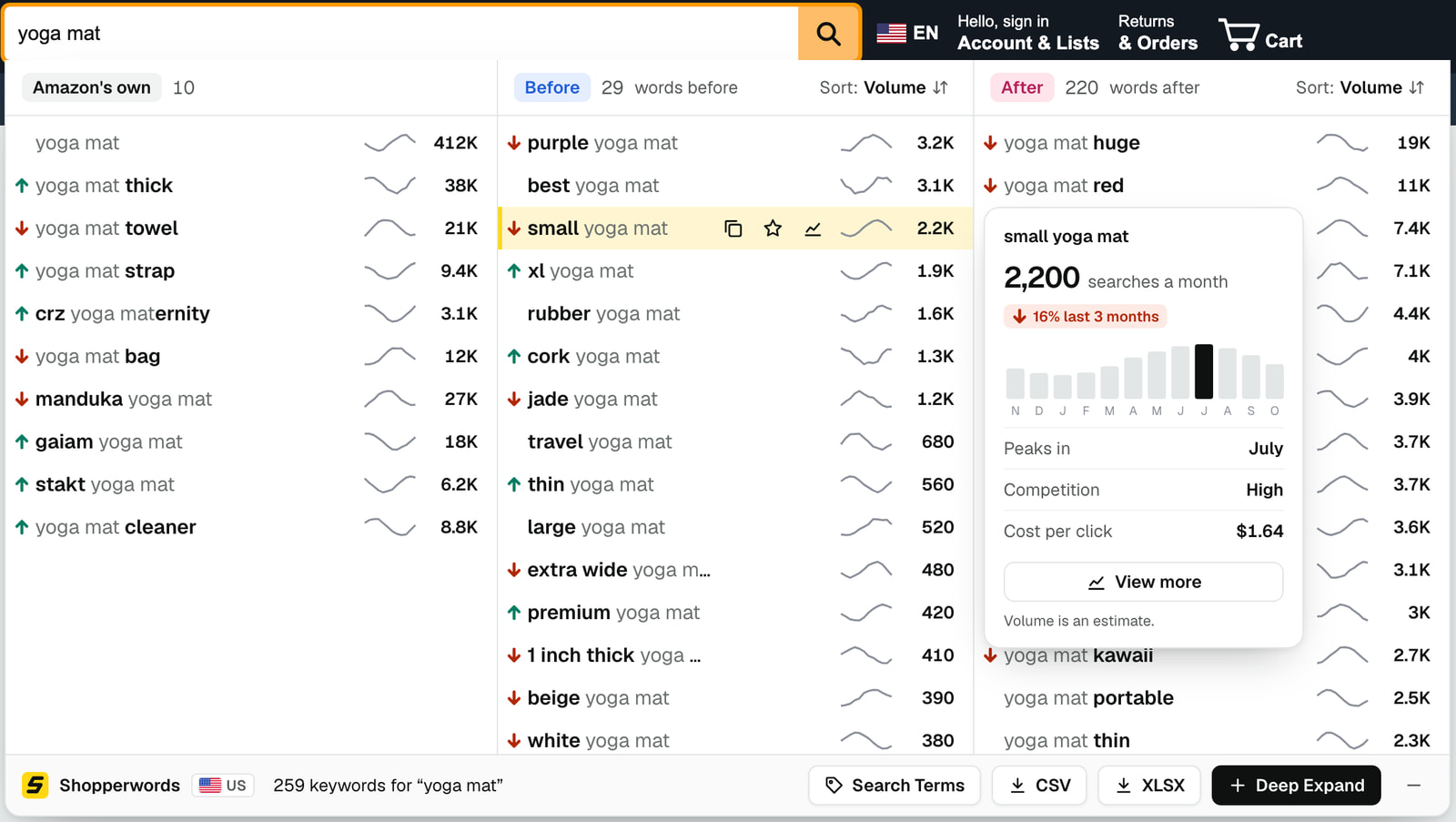
Know which keywords are worth the space. Pro adds estimated monthly searches to every keyword.
See search volume on every keyword
- Estimated monthly searches, sorted highest first
- A 12-month trend line on every row
- An arrow on keywords up or down 10% over 3 months
- Peak month, competition, and cost per click on hover
- View more: one keyword’s chart, busiest and quietest month, and longer keywords that contain it
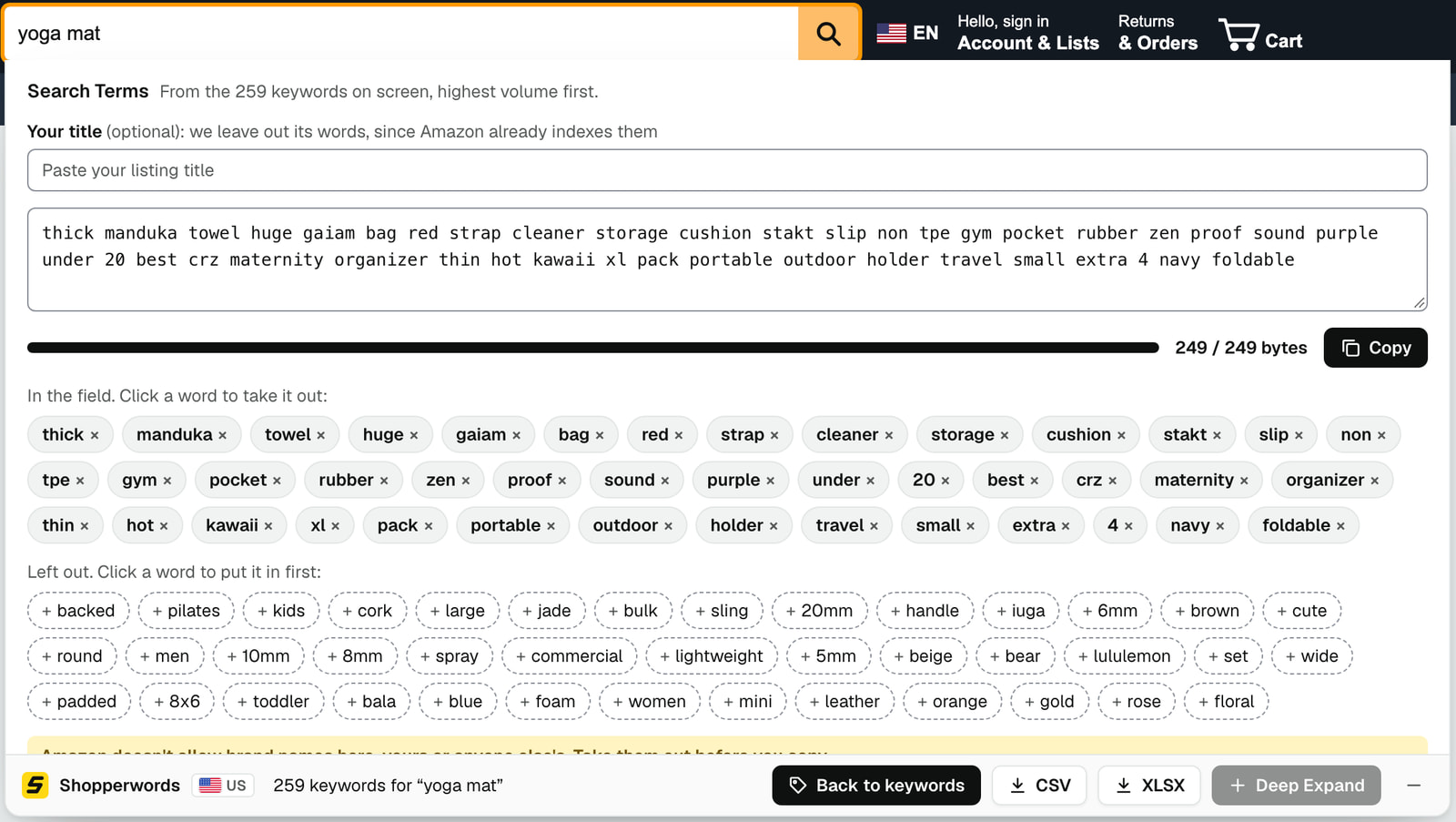
Fill the backend Search Terms field from your keywords
The Search Terms builder fills Amazon’s backend field with the best words from your keywords, highest volume first, up to its 249-byte limit.
- Paste your title to leave out its words
- Click a word to take it out or put it first
- Export to Excel (XLSX) with a word analysis sheet
Free for keywords. Pro for the numbers.
Free
$0
No account, no time limit
- Hundreds of keywords as you type
- Deep Expand
- Departments and exclude words
- Saved keywords and CSV export
- All 22 Amazon countries
Pro
$6.99 per month
Billed monthly
- Everything in Free
- Estimated monthly searches and trends
- View more: one keyword’s volume in depth
- Search Terms builder
- Excel (XLSX) export with word analysis
Cancel anytime in the extension’s settings.
Available on






Questions. Before you install.
Is Shopperwords free?
Yes. The keyword columns, Deep Expand, departments, exclude words, saved keywords, and CSV export are free, with no account and no time limit. Pro adds search volume and listing tools.
What does Pro add?
Pro adds estimated monthly searches to every keyword, with a 12-month trend, trend arrows, peak month, competition, and cost per click. Before and After sort by volume. View more opens one keyword’s volume in the dropdown: a chart of 3, 6 or 12 months or a range you pick, its busiest and quietest month, competition, cost per click, and longer keywords that contain it. Pro also adds the Search Terms builder and an Excel export with a word analysis sheet.
How accurate are the search numbers?
They’re estimates of monthly searches, not exact counts. Use them to compare keywords, not as a promise of traffic.
Where do the keywords come from?
Every keyword comes from Amazon’s autocomplete: the search suggestions shoppers see as they type. Shopperwords asks for many at once, letter by letter and with words in front of yours, then groups the answers. See examples on the Amazon keyword pages.
Which Amazon countries are supported?
Shopperwords works on 22 Amazon sites: United States, Canada, Mexico, Brazil, United Kingdom, Ireland, Germany, France, Italy, Spain, Netherlands, Sweden, Poland, Belgium, Türkiye, United Arab Emirates, Saudi Arabia, Egypt, India, Japan, Australia and Singapore.
Which languages does Shopperwords speak?
English, German, French, Italian, Spanish and Japanese. The extension follows your browser’s language; any other language gets English. The keywords themselves come from each Amazon store as its shoppers type them.
Do I need an Amazon account?
No. Shopperwords works whether or not you’re signed in to Amazon, and it needs no Shopperwords account either.
Does it change Amazon’s pages?
Only the search dropdown. While you type, Shopperwords shows its own dropdown under the search box in place of Amazon’s. It adds no ads and changes nothing else on the page.
How do I cancel Pro?
Open the extension’s settings and choose Manage or cancel subscription.
Is there a Firefox version?
Yes. Shopperwords works the same in Chrome and Firefox. Get it from Firefox Add-ons.
How do I get help?
Email support@shopperwords.com, and a person will answer.
See what your buyers type next time you search
Add Shopperwords to Chrome for free. No sign-up, in all 22 Amazon countries.
Add to Chrome